Tag: B2B Marketing

  • Website Compliance for Regulated Industries: A Practical Marketing Guide

    Website Compliance for Regulated Industries: A Practical Marketing Guide

    Important: This article provides general marketing and website-planning information. It is not legal advice. Laws, regulations and platform policies vary by industry, activity and jurisdiction. Organizations should obtain advice from qualified legal and compliance professionals for their specific circumstances.

    Last reviewed September 2026

    Every business website has rules to follow. Regulated industries add more layers to the work.

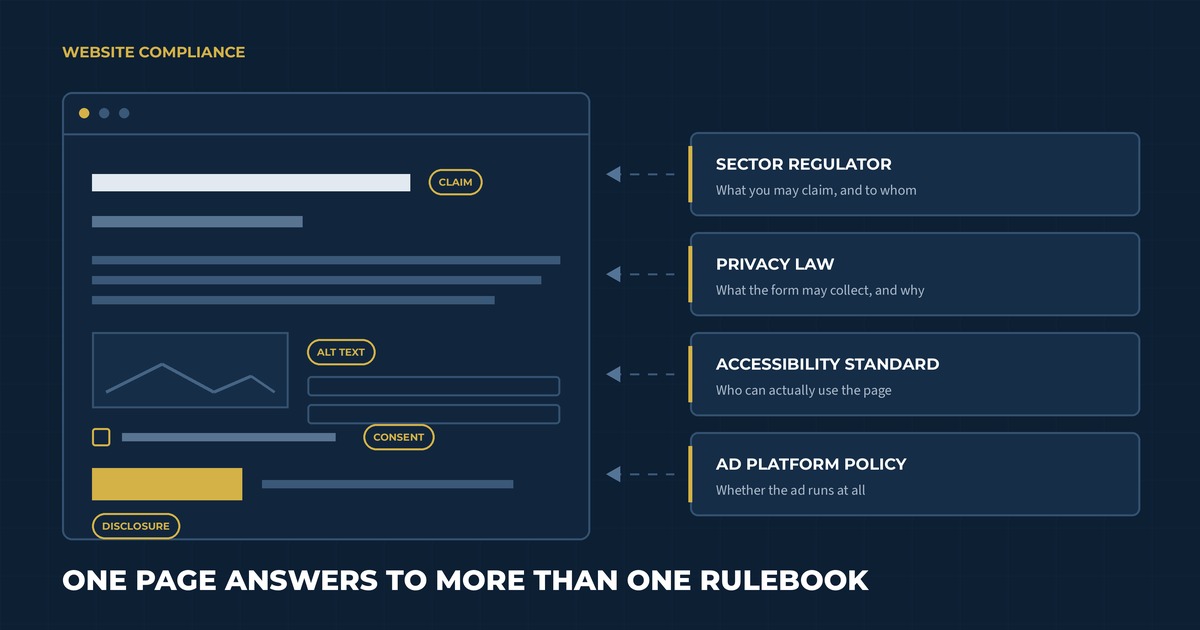
    A single page may need to satisfy sector-specific promotion rules, Canadian privacy requirements, accessibility standards and the policies of whichever advertising platform sends traffic to it. The wording of a headline can matter. So can the information collected by a form, the audience allowed to view a promotion and the evidence supporting a product claim.

    This complexity can slow marketing teams down when responsibilities are unclear. A thoughtful compliance process gives the team a shared way to plan, review and maintain the website. It also helps designers and developers build requirements into the structure before content reaches the final approval stage.

    What website compliance includes

    Website compliance is the practice of aligning a site with the requirements that apply to the organization and its digital activity.

    Those requirements may come from several places:

    • Federal, provincial or territorial law
    • An industry regulator or professional college
    • Privacy and accessibility standards
    • Advertising and email rules
    • Contracts, licensing agreements or funding conditions
    • Internal brand, risk and legal policies
    • Search engines, social networks and advertising platforms

    The applicable mix depends on what the company sells, where it operates and who uses the site. A cannabis equipment manufacturer will have a different requirements profile than a financial advisor, healthcare provider or registered charity.

    Start each project by identifying the rules before deciding how the website will communicate the offer. This gives web development and hosting, copy, design and compliance teams the same foundation.

    Build a requirements register before writing copy

    A requirements register is a working record of the obligations and policies that may affect the website.

    For each requirement, document:

    • The official source or policy
    • Which pages, audiences or actions it affects
    • The internal owner responsible for interpretation
    • Evidence or records the organization must retain
    • The review frequency
    • The date of the most recent confirmation

    Separate legal interpretation from marketing implementation. Counsel or a qualified compliance lead can explain what the organization must achieve. The marketing and web teams can then develop an effective way to meet that requirement within the customer experience.

    Make the register specific enough to guide a decision. One useful entry could read: “Quote-request forms collect business contact information for follow-up; the privacy notice must explain the purpose and any third-party sharing.”

    Include platform policies when they affect distribution. An advertisement can be restricted even when the destination page is permitted under the law. Search, social and advertising services each maintain their own eligibility rules, and those policies can change independently of legislation.

    Create risk levels for the website

    Some parts of a regulated website carry more risk than others. Classify pages and features according to the type of review they need.

    A simple risk model might classify content as:

    • Standard: Contact details, leadership biographies and general company information using approved language
    • Elevated: Product descriptions, testimonials, pricing, comparisons and downloadable resources
    • High: Health or performance claims, age-restricted promotions, financial projections, sensitive-data forms and content requiring a regulated disclosure
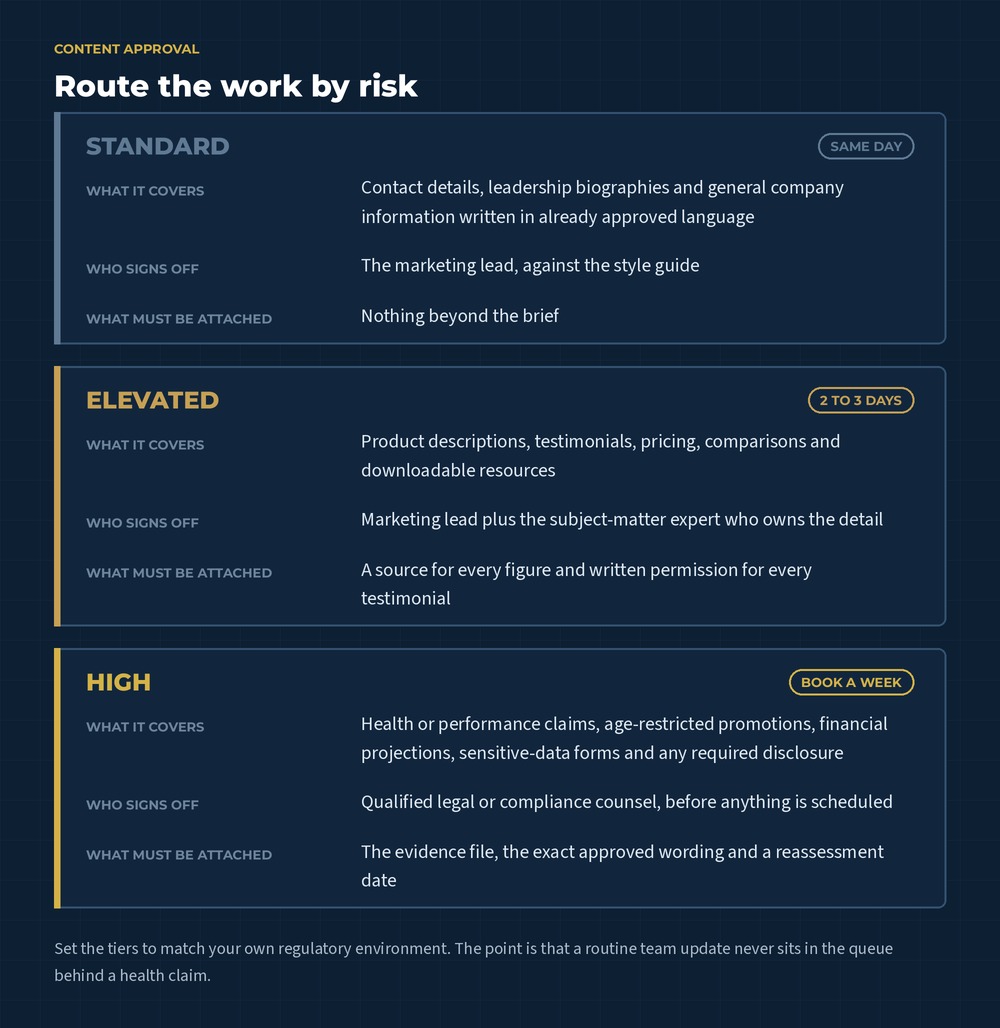
    Diagram routing website content into three review tiers. Standard content is signed off by the marketing lead the same day, elevated content needs a subject-matter expert and sources within two to three days, and high-risk claims wait for legal or compliance counsel.
    The tiers are worth writing down because they decide who has to touch a piece of work, not just how carefully it gets read. Most of the delay in regulated marketing comes from routine updates queuing behind claims.

    The categories should reflect the organization’s actual environment. Their purpose is to route work efficiently. A low-risk team update may follow a light approval path, while a new product claim needs supporting evidence and specialist review.

    Page templates can carry part of this logic. Required disclosures, consent text and approved calls to action can be built into the content management system. Editors still need guidance because context can change the meaning of otherwise approved language.

    Review the overall impression of every claim

    Website claims include more than direct promises. Images, headings, testimonials, charts and page layout can shape what a visitor understands.

    The Competition Bureau explains that the Competition Act prohibits materially false or misleading representations and applies a general impression test that considers the entire advertisement, including its words, graphic elements and overall layout, alongside its literal meaning.

    Create a claim record for statements that describe performance, outcomes, superiority, savings or measurable benefits. The record can include:

    • Exact approved wording
    • The evidence supporting it
    • Conditions or limitations
    • Approval date and reviewer
    • Pages and campaigns where the claim appears
    • Expiry or reassessment date

    Write qualifications close to the related claim and make them easy to notice. A disclosure hidden in a distant terms page may do little to correct an impression created by a prominent headline.

    Avoid stretching a customer testimonial beyond the person’s actual experience. Keep permission records and confirm that edits preserve the meaning of the original statement. If compensation or another material connection exists, obtain guidance on the disclosure needed.

    Environmental language needs the same discipline. The Competition Bureau’s greenwashing guidance for businesses emphasizes truthful, specific claims with adequate testing or substantiation where required.

    Understand industry-specific promotion rules

    Sector rules can influence who may access promotional content and how products are described.

    Health Canada’s guidance on the promotion of cannabis explains broad prohibitions and limited permitted forms of informational or brand-preference promotion. It also addresses youth appeal, testimonials, endorsements and health or cosmetic claims. Organizations connected to the cannabis sector should obtain advice on how the Cannabis Act and regulations apply to their products, services and role in the supply chain.

    Other industries may face rules concerning professional titles, required disclosures, audience eligibility, comparative claims or how testimonials can be used. Build those restrictions into the brief for brand messaging and copywriting. Writers need access to approved terminology and enough subject-matter context to explain the offer clearly.

    When an age gate, jurisdiction selector or eligibility check is required, define what the control must accomplish. Decide which content it protects, how users are verified, whether the selection is remembered and what happens when someone is ineligible. Test direct links to internal pages so the control works beyond the homepage.

    Collect personal information with a defined purpose

    Contact forms, quote requests, account registrations, analytics tools and chat systems may collect personal information.

    The Office of the Privacy Commissioner of Canada explains that meaningful consent under PIPEDA requires people to understand the nature, purpose and consequences of the collection, use or disclosure of their information. Because the applicable law depends on the organization’s activities and jurisdiction, confirm the requirements that apply.

    For every form, document:

    • The business purpose for each field
    • Whether the field is required or optional
    • Where the information is stored
    • Which employees and service providers can access it
    • How long it is retained
    • How a person can ask questions or exercise applicable rights

    Collect the information needed for the stated purpose. Industrial-equipment quote forms may reasonably ask about facility requirements, while newsletter forms often need far less.

    Place privacy information where it can help a person decide. Link to the full privacy policy and add concise, contextual language beside sensitive or unexpected requests. Review third-party embeds, analytics products and form integrations because data can move beyond the website’s immediate interface.

    A person who requests a quote expects a response to that request. Ongoing promotional email introduces a separate decision.

    The CRTC’s CASL guidance summarizes three core requirements for commercial electronic messages: consent, identification information and an unsubscribe mechanism, subject to the Act’s exceptions and specific circumstances.

    Design forms so the user’s choice is clear. Avoid preselected marketing boxes. Store the consent language, source, date and time alongside the contact record. If the offer includes several types of communication, explain what the subscriber will receive.

    Marketing automation can preserve this information and route contacts according to their permissions. Build suppression and unsubscribe handling into the system so preferences remain consistent across campaigns and connected tools.

    Include accessibility in the compliance plan

    Accessible design helps people with visual, auditory, motor and cognitive disabilities use the website. It also improves many everyday interactions, including navigating by keyboard, reading captions in a quiet space and completing forms on a small screen.

    In Ontario, the AODA website requirements apply to designated public-sector organizations and businesses or non-profits with 50 or more employees. The province’s current guidance says covered public websites and applicable content published after January 1, 2012 must meet WCAG 2.0 Level AA, with specified exceptions for live captions and prerecorded audio descriptions. Review the official Ontario website accessibility guidance and the current regulation when assessing legal duties.

    Smaller organizations can still use accessible practices to serve more people and prepare for growth. Common areas to test include:

    • Keyboard navigation and visible focus states
    • Text alternatives for meaningful images
    • Colour contrast and readable type
    • Labels, instructions and error messages for forms
    • Captions and transcripts for multimedia
    • Heading structure and descriptive links
    • Zoom, reflow and mobile interaction
    • Accessible PDFs and downloadable documents

    Automated tools can identify certain issues. Manual review and testing with assistive technology reveal barriers that scanners may miss. Ontario’s guidance recommends a combination of automated assessment, assistive-technology testing and feedback from people with disabilities when possible.

    The W3C now recommends WCAG 2.2 as the latest version of the international standard. It is designed to be backward compatible with earlier WCAG 2 versions. An organization can use the newer guidance as a forward-looking design standard while confirming which version its governing law or policy references.

    Build SEO around approved, useful language

    Regulated businesses still need search visibility. Effective SEO and content systems can work within approved language and help qualified visitors reach accurate information.

    Begin keyword research with the terms customers use, then map them against the claims and terminology the organization can support. Search demand never creates permission to publish a restricted phrase. Compliance review should flag keywords that imply an unapproved benefit or alter the overall impression of a page.

    Create useful content around the questions the business can answer responsibly. Product specifications, process explanations, maintenance guidance and buying criteria may offer strong search value. Clear author and reviewer information can help readers understand where the expertise comes from.

    Maintain one approved source for recurring descriptions and disclosures. Update related pages when guidance, evidence or product information changes. This prevents old wording from lingering in blog posts, PDFs and campaign landing pages.

    Internal links should help visitors move from education to the appropriate product, service or contact page. For a catalogue-based business, our guide to building a product catalogue website as a sales tool explains how product data and conversion paths can work together.

    Check the full advertising path

    Compliance review should follow the customer’s entire path from advertisement to follow-up.

    The ad, landing page, form, confirmation message and automated email may each be reviewed under different requirements. Keep the promise consistent across them. If a paid campaign uses an approved offer, the landing page should present the same eligibility, pricing and limitations.

    Advertising platforms can restrict industries, products and targeting methods beyond the requirements of the law. Confirm current platform policies during campaign planning and again before launch. Build enough lead time for certification, identity verification or manual review where applicable.

    Uncommon’s paid ads service can connect campaign strategy to an appropriate landing experience. Legal and compliance approval remains with the organization and its qualified advisors.

    Create a content approval workflow that moves

    Regulated marketing slows down when content arrives for review without context. A structured request makes decisions easier.

    Send reviewers a package that includes:

    • The intended audience and jurisdiction
    • The page goal and traffic source
    • New or changed claims highlighted clearly
    • Supporting evidence and source links
    • Required disclosures
    • The proposed publication and review dates

    Assign decision rights in advance. Specify who can approve brand language, interpret legal requirements, verify technical specifications and publish changes. Include a clear escalation route when reviewers disagree or the rule is uncertain.

    Use version control so the published page matches the approved draft. Record material changes and keep evidence attached to the related claim or campaign. Restrict permissions for high-risk templates while allowing trained staff to manage routine updates.

    Service-level expectations can keep review from becoming an open-ended queue. Set realistic turnaround times for each risk category and account for those windows in the campaign schedule. This is one of the places where marketing strategy and management earns its keep, because someone has to own the calendar that the review windows sit inside.

    Maintain compliance after launch

    Websites change through new pages, plugin updates, campaign experiments and staff turnover. Ongoing maintenance protects the work completed during the original build.

    Set a review schedule based on risk. High-impact claims and regulated product pages may need more frequent checks than a general company history. Subscribe to updates from relevant regulators and platforms. Revisit the requirements register when the organization enters a new jurisdiction, changes its offer or adds a data-collection tool.

    Monitor the live website for:

    • Expired claims or outdated evidence
    • Broken consent and unsubscribe flows
    • Accessibility regressions
    • Missing disclosures
    • Unapproved changes to protected copy
    • Forms sending data to the wrong system
    • Old campaign pages that remain indexable

    Create a response process for errors. Identify who can remove or correct content quickly, who assesses affected records or campaigns and how the organization documents the resolution.

    What this looked like for Harvest Supply Canada

    Harvest Supply Canada is a Port Colborne manufacturer and custom fabricator serving the cannabis industry. The company produces stainless-steel drying racks, trays and conveyor systems for commercial operations.

    Its website needs to explain specialized products and engineering capabilities within a highly regulated market. The content also supports a B2B sales process where buyers may need technical details and a conversation before choosing a solution.

    The build treated the regulatory requirements as part of the design brief rather than a final approval step. Every visual and content element was reviewed against cannabis marketing rules, age verification was implemented as part of the structure rather than bolted on afterwards, and the restrained palette and technical layouts were chosen to communicate precision to professional buyers instead of promoting a product. The site was also built so the team could keep content and disclosures current as the business and the regulations change, which is the part that decides whether a compliant launch stays compliant.

    Explore the Harvest Supply Canada case study for the full project overview.

    Website compliance checklist for regulated businesses

    Use this checklist when planning a website or campaign:

    1. Identify the laws, regulations and policies that apply.
    2. Confirm the jurisdictions and audiences the website serves.
    3. Assign a qualified owner to interpret each requirement.
    4. Classify pages and features by risk.
    5. Record approved claims and the evidence behind them.
    6. Build required disclosures and controls into templates.
    7. Define the purpose of every form field.
    8. Review data storage, access and retention.
    9. Capture marketing consent separately where appropriate.
    10. Test accessibility with automated and manual methods.
    11. Map approved search terms to useful content.
    12. Review the path from ad through automated follow-up.
    13. Document approval roles and turnaround times.
    14. Keep a version history for high-risk content.
    15. Schedule recurring audits and regulatory reviews.
    16. Maintain a process for correcting live issues quickly.

    The checklist should evolve with the organization. Every new product, audience or platform can introduce additional requirements.

    Build compliance into the website from the beginning

    A regulated-industry website can be clear, useful and persuasive while respecting the rules that shape the business. Success depends on early planning and a review process the team can sustain.

    Uncommon brings web development, messaging, SEO and automation together around the customer journey. Contact the Uncommon team to discuss a website that supports your marketing and your compliance process.
    Plan a Compliant Website
  • How to Turn a Product Catalogue Website Into a Sales Tool

    How to Turn a Product Catalogue Website Into a Sales Tool

    A product catalogue website can hold hundreds or thousands of items and still leave buyers wondering where to begin.

    This usually happens when the catalogue was built around internal product data. Categories mirror the company database. Filters use language familiar to the sales team. Product pages display whatever information happened to be available during upload.

    Customers arrive with a different point of view. They may know the outcome they need, the equipment they already own or the budget they need to stay within. Some have a model number ready. Others are still trying to understand which type of product solves the problem.

    A useful catalogue helps both groups move forward. It connects product data to the way people research, compare and decide while giving every page a job within the larger marketing system. Our guide to building a connected marketing system covers how those pieces support one another; a catalogue is where that system either earns the sale or quietly loses it.

    Decide what the catalogue should help people do

    Begin with the action a qualified visitor should be able to take.

    For a retail business, that action may be adding a product to a cart. A manufacturer might want visitors to request a quote, download technical documentation or find a distributor. Wholesale buyers may need to build an order list before contacting an account representative.

    Several actions can exist across the site. Each product type should still have one clear primary path.

    This decision affects the entire build. Direct-purchase catalogues need pricing, availability and a streamlined checkout. Quote-driven sites require enough technical detail to qualify interest, along with a form that captures the information sales requires. Businesses using distributors need location and territory logic that reliably sends buyers to the right contact.

    Before changing colours or page layouts, document the catalogue’s purpose in a sentence:

    The catalogue helps [type of buyer] identify the right [product category] and [take the next step].

    That statement gives the design, content and development teams a shared standard for evaluating every decision.

    Organize products around how customers search

    Internal teams often group products by department, supplier or manufacturing process. Buyers may think in terms of application, compatibility, industry, size or a problem they need to solve.

    Research those patterns before designing the main navigation. Useful sources include:

    • Website search data
    • Sales and customer-service questions
    • Search Console queries
    • Distributor or dealer feedback
    • Competitor terminology
    • Interviews with new and experienced customers

    The goal is to identify the language buyers use and the details that help them narrow their choices.

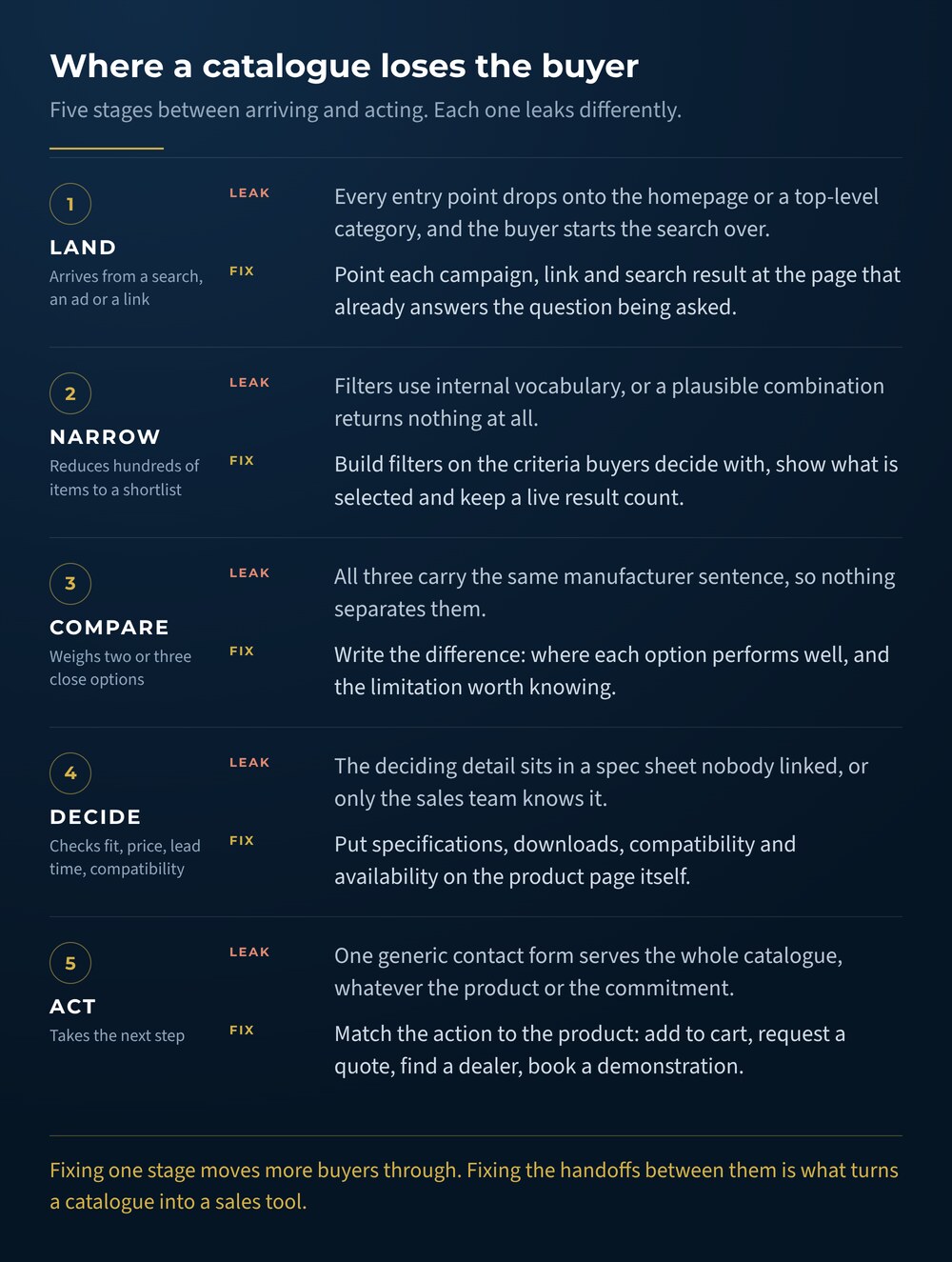
    Diagram of five stages a catalogue buyer moves through, land, narrow, compare, decide and act, with the common failure and the fix at each stage.
    Most catalogues do not fail in one place. They lose a share of buyers at each handoff, and the fixes are different at every stage.

    Build a category structure that feels predictable to someone outside the company. Keep top-level choices broad enough to scan, then let subcategories and filters handle specificity. Breadcrumbs can help visitors understand where they are within a large catalogue and move back through the hierarchy. Google also explains how breadcrumb markup can communicate page position in search results.

    Test the draft structure with realistic tasks. Ask someone unfamiliar with the database to find a product for a specific use case. Watch where they pause, which terms they misunderstand and whether they choose the route the team expected.

    Create a reliable product data model

    Large catalogues become difficult to manage when each product record follows a different pattern.

    Define the information every product type needs before building templates. Depending on the business, the data model may include:

    • Product name and model number
    • Category and subcategory
    • A short summary written for the buyer
    • Key specifications
    • Compatible products or systems
    • Available sizes, colours or materials
    • Product images and diagrams
    • Pricing or quote requirements
    • Availability and lead time
    • Downloads, manuals or safety sheets
    • Warranty, shipping or return details

    Some fields will apply only to certain categories. Keep shared fields consistent wherever possible so products can be filtered, compared and updated reliably.

    Data standards matter just as much as field selection. Decide how measurements are formatted, which abbreviations are acceptable and how product names are written. Establish a source of truth for pricing, inventory and model information. Document who owns each field and how updates reach the website.

    This foundational work protects the catalogue from becoming inconsistent again six months after launch.

    Make filters reflect meaningful differences

    Filters should help buyers reduce a large set of choices using criteria they understand.

    For a fitness equipment catalogue, useful filters might include equipment type, training goal, available space, price range or brand. An industrial catalogue may need voltage, material, load rating, dimensions or compatibility.

    Every filter should represent a meaningful distinction in the decision. Avoid showing filters that produce empty or nearly identical result sets. Use clear labels, show selected options and make it easy to remove a filter without starting over.

    The Baymard Institute’s product-list and filtering research is based on thousands of usability-testing sessions and extensive benchmarking of leading ecommerce sites. Its work shows how much deliberate user-experience planning sits behind product lists that feel simple to use.

    Mobile behaviour deserves its own testing. Filters that work comfortably in a desktop sidebar may need a different presentation on a phone. Selected options should remain visible, and the results count should help users understand whether they have narrowed the list too far.

    Buyers who know what they want often go directly to the search bar. Catalogue search needs to understand more than exact product names.

    Plan for common abbreviations, model numbers, spelling errors and older terminology. Add synonyms when customers use a different phrase than the product database. Search results should reveal enough information to distinguish similar items without forcing visitors to open every page.

    Review searches that produce no results. They may reveal missing products, unfamiliar terminology or demand for information your site currently hides. Queries that receive many searches and few clicks can signal weak result labels or poor relevance.

    Search data can also guide future SEO and content work. A recurring non-product question may deserve a buying guide, glossary page or comparison article that links back into the appropriate catalogue category.

    Build product pages that support a decision

    A product page should answer the questions a buyer would ask before taking the next step.

    Start with a clear product name and a short explanation of who the item is for or what it helps them accomplish. Follow with scannable specifications, strong images and the information needed to evaluate fit.

    The page may also include:

    • Use cases or recommended applications
    • Compatibility details
    • Variant options
    • Delivery or installation information
    • Related accessories
    • Downloads and technical resources
    • Frequently asked questions
    • Proof from customers or completed projects

    Original product photography can make details easier to understand and give the catalogue a more consistent visual language. Uncommon’s photography and visual brand asset service can support product images, demonstrations and branded media for use across the website.

    Write descriptions that help a buyer distinguish the product from nearby alternatives. Repeating a manufacturer sentence across dozens of pages gives customers little guidance and creates weak search content. Explain the meaningful differences, the context in which each option performs well and any limitations a buyer should understand.

    Offer the right conversion path

    Some catalogue visitors are ready to buy. Others need pricing, technical confirmation or help choosing between similar products.

    Match the call to action to the product and the level of commitment required. Options may include:

    • Add to cart
    • Request a quote
    • Ask a product specialist
    • Find a dealer
    • Check availability
    • Book a demonstration
    • Download the specification sheet

    Use one visually dominant action on each template and place supporting actions nearby. Give buyers enough context to understand what happens after they click. Quote forms can mention the expected response time, while dealer finders can explain what information is needed to show local results.

    Keep forms focused on the information required for the next conversation. Long forms can be appropriate for complex products when each field has a clear purpose. Conditional questions can reduce clutter by showing detailed fields only when they apply.

    Once a form is submitted, marketing automation can route the inquiry, send the relevant resource and alert the correct salesperson. The confirmation page should explain the next step and provide a way to continue researching. If you are sending paid traffic into the catalogue, it is worth reading before you run ads, check the page people will land on first.

    Help search engines understand the catalogue

    A catalogue contains many pages with related terms, variants and attributes. Clear technical structure helps search engines find and interpret that content.

    Google’s ecommerce SEO guidance covers navigation, site structure, URLs and product data. Many recommendations also apply to catalogues where products are researched online and purchased through a dealer or sales representative.

    Important foundations include:

    • Crawlable links between categories and products
    • Descriptive, stable URLs
    • Unique page titles and descriptions
    • Useful category copy
    • Canonical handling for variants and filtered URLs
    • XML sitemaps that include active product pages
    • Redirect plans for discontinued or renamed products

    Structured data can give Google explicit information about a product. The correct implementation depends on whether the page supports a direct purchase, displays a product for research or represents several variants. Google provides separate guidance for product variants and merchant listings.

    Pagination and “load more” patterns also need technical planning. Google’s guide to pagination and incremental page loading explains how user-friendly display patterns can affect product discovery by crawlers.

    Web development and hosting should bring these search requirements into the build from the beginning. Repairing crawl paths and URL logic after hundreds of pages are live is far more disruptive.

    Protect speed and accessibility as the catalogue grows

    Product catalogues are vulnerable to slow pages because they rely on images, filters, third-party scripts and large databases.

    Compress images appropriately, use responsive image sizes and avoid loading every product asset at once. Test real category and product pages on mobile connections. The web.dev performance guidance explains how Core Web Vitals measure loading speed, responsiveness and visual stability from a user’s perspective.

    Accessibility should be built into templates and content workflows. Product images need useful text alternatives when they convey information. The W3C recommends using short alt text that communicates an image’s meaning or function. Form labels, keyboard navigation, colour contrast and visible focus states also need testing throughout search, filtering and conversion flows.

    A fast, accessible catalogue gives more buyers a dependable way to use the site. It also reduces the chance that future products inherit problems hidden inside the original template.

    Plan how the catalogue will stay accurate

    The launch date is the beginning of the catalogue’s operational life.

    Create a workflow for new products, revisions and discontinued items. Decide who approves copy, specifications, imagery and pricing. Establish what happens when an item is replaced by a newer model and which historical URLs should remain available for support or search demand.

    Where possible, connect the website to the system that already manages product information. An integration can reduce duplicate entry and prevent conflicts between the site, inventory platform and sales materials. Human review remains important for customer-facing descriptions, categorization and merchandising decisions.

    Schedule regular catalogue audits. Look for missing images, empty fields, broken downloads, outdated calls to action and products that have become difficult to reach through navigation. Analytics and internal search data can show where visitors struggle or abandon the process.

    Measure whether the catalogue supports sales

    Page views show activity. Sales-focused measurement reveals whether visitors are moving toward a useful outcome.

    Track the actions that match the catalogue’s purpose, such as:

    • Product-to-quote conversion rate
    • Add-to-cart and completed-purchase rate
    • Dealer-finder usage
    • Specification or catalogue downloads
    • Product comparison activity
    • Contact requests by category
    • Internal searches with no results
    • Revenue or qualified opportunities influenced by catalogue pages

    Review performance by category and traffic source. Highly technical products may attract fewer visitors while generating more valuable inquiries. Popular categories with weak conversion may need clearer selection guidance or a stronger next step.

    Connect website data to the CRM when the sales process continues offline. This helps the team see which categories generate qualified opportunities and which resources appear in successful buying journeys. It is the same principle behind a website that does more than exist politely online: the site has a job, and the job is measurable.

    What this looked like for Beyond the Basics Fitness

    Beyond the Basics Fitness needed to rebuild a catalogue containing 678 products. At that scale, the website had to do more than display inventory. Buyers needed a clear way to move through the range and find the information relevant to their decision.

    The rebuild treated structure as the product. Behind those 678 items sat 1,779 product images, 52 manufacturer brands, 42 categories and 181 tags, all of which had to be reconciled into one predictable taxonomy before a single template was designed. Because commercial fitness equipment is quote-driven rather than cart-driven, the primary action on a product page is a quote request, and buyers can gather several items into a shared wishlist before they contact the team. Legacy URLs were mapped through 1,447 redirects so the search visibility the old catalogue had earned survived the move.

    The project is a useful example of treating catalogue structure as part of the sales experience. Product organization, page templates and conversion paths need to work together when hundreds of individual records are involved.

    Explore the Beyond the Basics Fitness case study to see how Uncommon approached rebuilding a large catalogue as a practical sales tool.

    Product catalogue website checklist

    Use this checklist before a catalogue rebuild or major update:

    1. Define the primary action for each product type.
    2. Map how customers describe products and narrow their options.
    3. Create a consistent data model for every category.
    4. Standardize names, measurements and product attributes.
    5. Design filters around meaningful buying criteria.
    6. Improve search with synonyms, model numbers and common misspellings.
    7. Write descriptions that explain differences between similar products.
    8. Add useful images, specifications and downloads.
    9. Match calls to action to the buyer’s next step.
    10. Build crawlable categories, stable URLs and sensible variant handling.
    11. Test page speed, mobile usability and accessibility.
    12. Connect form submissions to a reliable follow-up process.
    13. Assign ownership for ongoing product updates.
    14. Measure qualified actions by product category.

    The best place to begin is the part of the catalogue that creates the most friction for customers or the most value for the business. Improving one high-priority category can reveal the data, content and development standards needed for the rest of the site.

    Build a catalogue that helps customers choose

    A large product range becomes easier to sell when the website helps buyers understand it. Clear structure, reliable data and useful decision support can turn a crowded catalogue into one of the strongest tools available to sales and marketing.

    Uncommon combines web development, SEO and automation to build catalogue experiences around how customers actually buy. Contact the Uncommon team to talk about rebuilding or improving your product catalogue website.

    Plan Your Catalogue Rebuild
  • B2B Content Strategy: How to Turn Your Team’s Expertise Into a System People Trust

    B2B Content Strategy: How to Turn Your Team’s Expertise Into a System People Trust

    Most B2B companies are sitting on more content than they realize.

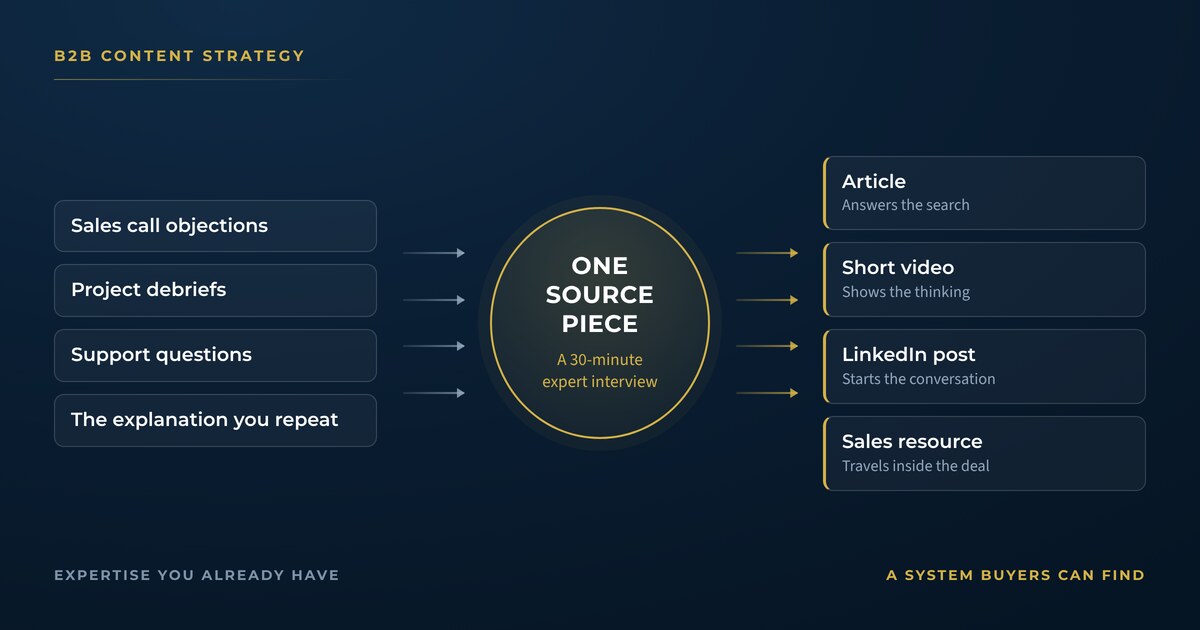
    It lives in sales calls, project debriefs, support emails and the explanations your team gives so often that they barely notice the value anymore. Inside the company, people understand why buyers hesitate and which expensive mistakes appear six months into a project. They can also explain an industry change in plain language.

    That knowledge can become a useful B2B content strategy. The challenge is getting it out of people’s heads and into a system your audience can find, understand and remember.

    A dependable system also gives each piece of content somewhere to go. Video can support a service page, while a customer question can become a search-friendly article. Strong opinions can start useful LinkedIn conversations and later shape sales resources.

    This is where B2B content starts contributing to the larger marketing picture. Our guide to building a connected marketing system explains how your website, search presence, reviews, social media and advertising can support one another. Content supplies the ideas and proof that move through that system.

    Why B2B content has influence before the sales call

    B2B buying decisions often involve people who never appear on your lead form. A department head may love the solution while finance, procurement, IT or compliance quietly shapes the final decision.

    The 2025 Edelman and LinkedIn B2B Thought Leadership Impact Report calls these stakeholders “hidden buyers.” The report draws on responses from nearly 2,000 professionals and explains how useful thought leadership can reach people who have limited contact with sales teams.

    That matters because a sales presentation cannot carry the whole job of building confidence. Buyers may encounter your company through a colleague’s post, a Google search or an article shared inside their team. Each encounter helps them decide whether your business understands their situation.

    Strong content gives those buyers something useful to pass along. It can explain the cost of the problem, provide language for an internal discussion or help a stakeholder evaluate possible approaches. By the time someone books a call, several people may already have formed an opinion about your expertise.

    Smaller B2B companies have a genuine opening here. Edelman’s analysis found that 53% of B2B decision-makers say brand recognition matters less when a company’s thought leadership is strong. Helpful ideas can earn attention even when a better-known competitor has a larger budget.

    Begin with the business outcome

    A content calendar is easier to fill when the team knows what the content needs to accomplish.

    Choose one primary business outcome for the next quarter. You may want to become known in a specific industry, support a service with a long sales cycle, enter a new market or generate better-qualified conversations.

    The outcome should be specific enough to guide topic decisions. For example, “help Ontario manufacturers understand when their legacy training process has become a growth constraint” gives the team more editorial guidance than a broad activity goal such as “post more on LinkedIn.”

    This decision also helps you avoid a familiar B2B content trap: publishing a wide assortment of company updates that have little connection to what prospective customers need. Team milestones and event photos can still have a place. They work best alongside content that teaches, interprets and demonstrates how your company thinks.

    If your business needs help defining that larger direction, marketing strategy and management can connect content decisions to revenue goals, customer priorities and the rest of your marketing plan.

    Map the people involved in the decision

    A useful B2B content strategy accounts for more than the person who will use the product or service every day.

    Start by mapping the roles that influence a typical decision. For each role, document:

    • What they are responsible for protecting or improving
    • Which risks are most likely to concern them
    • What evidence they need before supporting a purchase
    • Which questions they may ask when your contact presents the idea internally

    An operations lead may care about implementation time. Finance may want to understand total cost and expected return. An executive sponsor may need confidence that the project supports a larger priority. Your content does not need to address every stakeholder in every piece. Across the system, it should help the buying group reach a shared understanding.

    This exercise usually reveals valuable content topics. Technical FAQs may help evaluators, while cost-of-delay articles can support budget discussions. Implementation guides can reduce anxiety for the team responsible for rollout.

    Build topics from real conversations

    Keyword research has an important place in a B2B SEO and content system. Your team’s everyday conversations add context that keyword tools cannot fully capture.

    Collect questions from sales, customer success, project delivery and leadership. Look for phrases such as:

    • “Customers are always surprised when…”
    • “The main reason projects get delayed is…”
    • “People usually compare us with…”
    • “We wish prospects understood this before calling…”

    Turn those observations into a working question bank. Then review search data to see how buyers express related needs online. The strongest topics often sit where customer language, business expertise and relevant search demand overlap.

    Google recommends creating helpful, people-first content that demonstrates first-hand expertise and leaves readers with enough information to move toward their goal. A subject-matter expert’s direct experience can provide the examples, nuance and practical guidance that make an article genuinely useful.

    Choose a small set of durable themes

    Content pillars give your team repeatable territory without forcing every post into the same format.

    A B2B software company might focus on adoption, operational efficiency, data governance and industry change. Professional services firms may build themes around common risks, decision-making, implementation and measurable outcomes.

    Each theme should meet two tests:

    1. Your audience regularly needs help with it.
    2. Your company has credible experience worth sharing.

    Four or five durable themes are usually enough to create range while keeping the brand recognizable. They can support articles, videos, newsletters, webinars and social posts over time.

    Once the themes are set, create a simple idea bank beneath each one. Add questions, stories, client examples, data points and opinions as they surface. This gives the team a shared place to capture useful material before it disappears into another meeting.

    Create one strong source piece, then adapt it thoughtfully

    Content repurposing works best when the source material has depth.

    A monthly interview with a subject-matter expert can produce enough material for a substantial article, a short video series, several social posts and a sales follow-up resource. Recorded webinars can lead to an FAQ page and a set of clips organized around individual questions.

    Each version should suit the place where it appears. A LinkedIn post may lead with a sharp observation from the interview. The article can explain the full idea and target a relevant search query. A sales email can point a prospect to the section that addresses their concern.

    Content production can help turn internal knowledge into polished video and audio assets. Social media management gives those assets a consistent publishing rhythm and creates space for conversation around them.

    The source-piece approach reduces the pressure to invent unrelated ideas every day. It also lets the audience encounter the same useful perspective in several formats without receiving identical copy on every channel.

    Give every channel a clear role

    B2B teams often spread content across several platforms without deciding what each one contributes.

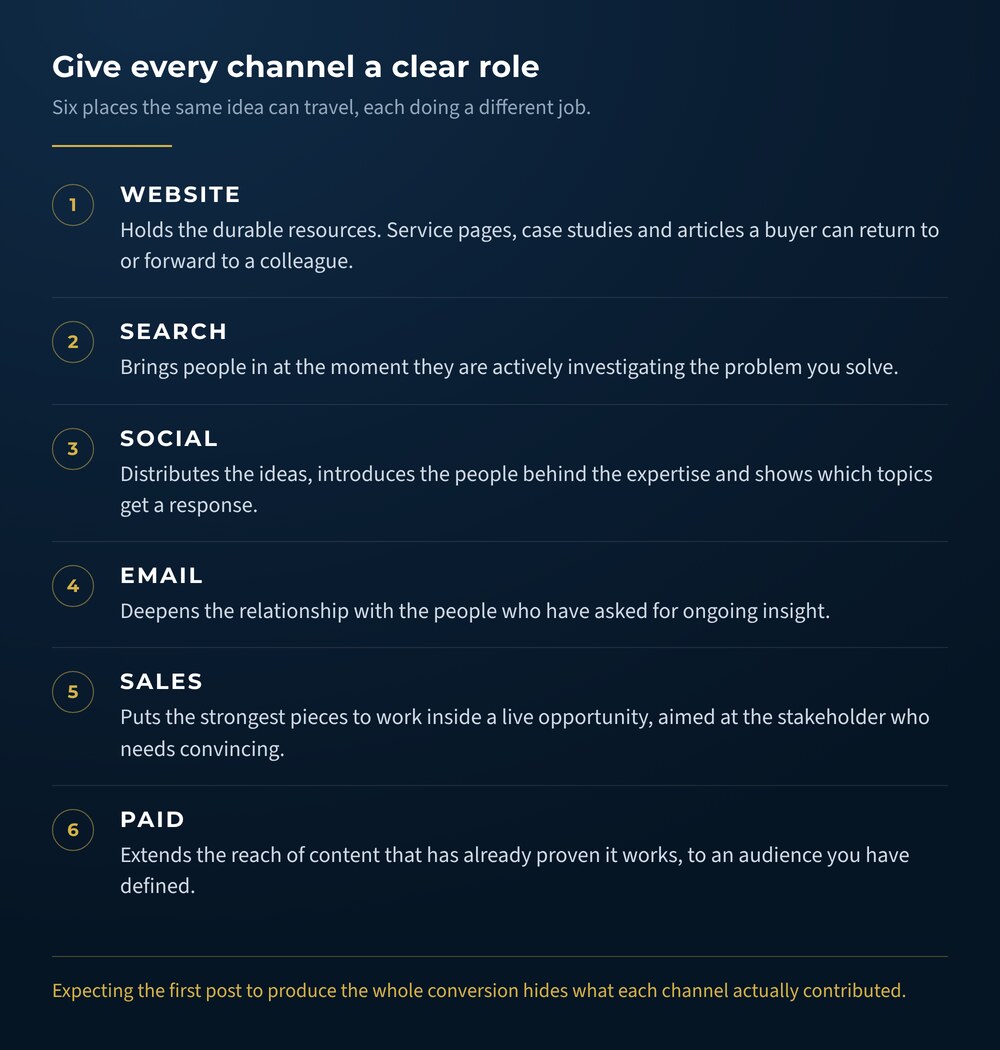
    Your website should hold durable resources: service pages, case studies, articles and tools that buyers can revisit or share. Search helps people discover those resources when they are actively investigating a problem. Social channels distribute ideas, introduce the people behind the expertise and reveal which topics create a response.

    Diagram listing six marketing channels and the job each one does in a B2B content system: website, search, social, email, sales and paid.
    The same idea can travel through six places. Each one is doing a different job, and only one of them closes.

    Email can deepen the relationship with people who want ongoing insight. Sales teams can use the strongest pieces during active conversations. Paid distribution can extend the reach of proven content to a defined audience.

    This structure also makes measurement more useful. A social post may create awareness while the linked article answers a detailed question. The service page then helps the reader understand the offer and choose a next step. Expecting the first post to produce the entire conversion hides the contribution each channel makes.

    Create an editorial workflow people will use

    The content system needs to fit the people responsible for keeping it alive.

    Assign a clear owner for each stage: idea selection, expert input, drafting, review, design, publishing and distribution. One person may handle several stages. The important part is knowing where a piece stands and who moves it forward.

    Set response windows for reviews. A subject-matter expert who receives a focused draft with two questions is more likely to respond than someone asked to “take a look whenever you can.” Keep approval criteria simple enough that every reviewer understands what they are checking.

    One workable monthly rhythm could include:

    • A 30-minute expert interview
    • One substantial source piece
    • Four to eight adapted social posts
    • An email built around the month’s strongest idea
    • A short review of performance and audience questions

    Your cadence may be lighter or more ambitious. Consistency comes from matching the plan to available time, then protecting that time on the calendar.

    Marketing automation can support distribution and follow-up once the editorial process is stable. Automation is especially useful for routing form submissions, delivering resources and nurturing contacts who are interested but still early in their decision.

    Keep expert-led content clear and specific

    Expertise can become hard to see when content is packed with abstract language.

    Replace broad claims with observations that a buyer can use. “We provide innovative solutions” says little. A detailed explanation of the early warning signs that a system will fail at scale gives the reader something concrete to consider.

    Examples build credibility because they show how the idea behaves in the real world. Walk through a decision, explain a trade-off or describe what changed after a team tried a different approach. Protect confidential information while preserving enough detail to make the lesson meaningful.

    Research can strengthen the argument, particularly when you link to the original source. The 2025 LinkedIn B2B Marketing Benchmark found that 94% of surveyed B2B marketers viewed trust as essential to success. That trust grows when a company’s content is accurate, useful and recognizably connected to real experience.

    Connect attention to a sensible next step

    Thought leadership can create interest without turning every paragraph into a pitch.

    Make the next step easy to find when a reader is ready. Link an article to the most relevant service page. Add a related case study when the reader may want proof. Offer a consultation, guide or assessment that fits the topic.

    The path should make sense from the reader’s perspective. Someone reading an introductory article may want another practical resource. Visitors comparing approaches may be ready for a case study, while people reviewing implementation details may want a conversation with your team.

    Use descriptive link text so readers understand where a link will take them. It improves usability and helps search engines interpret the relationship between pages.

    Measure whether the system is building useful momentum

    Reach and engagement can show which ideas attract attention. B2B content also needs measures that reflect how people research and buy.

    Track indicators such as:

    • Visits to service and case-study pages from content
    • Qualified inquiries that mention an article, video or speaker
    • Email subscriptions from high-intent resources
    • Content used by sales during active opportunities
    • Repeat visits from target companies or industries
    • Invitations to speak, collaborate or contribute

    Review performance by theme and format over a meaningful period. A technical article may attract modest traffic while becoming a valuable sales asset; short videos may create broader awareness and reveal topics worth developing in depth.

    Keep a record of questions that appear in comments, calls and emails after publication. Those questions are evidence of interest and fuel for the next round of content.

    What this looked like for XpertVR

    XpertVR develops virtual reality training simulations for universities and organizations. The company had a knowledgeable co-founder, a highly visual product and plenty of valuable material. Their content activity was spread unevenly across channels, which made it difficult to build a recognizable presence.

    Uncommon helped create a repeatable content framework. The work included establishing a publishing cadence, auditing earlier videos and articles into a searchable content library, relaunching the newsletter, expanding short-form video and improving profile language and cross-links.

    That framework helped XpertVR add more than 1,000 relevant LinkedIn followers for its co-founder within a few months. It also supported partnerships with Conestoga College and Brock University, speaking invitations and greater internal participation in content creation.

    The value came from organizing the expertise the company already had and making it easier to publish consistently. Explore the complete XpertVR content strategy case study to see how the framework supported authority and new opportunities.

    A practical B2B content strategy checklist

    Use this list to review your current system:

    1. Define one business outcome for the next quarter.
    2. Map the people who influence a typical buying decision.
    3. Collect recurring questions from customer-facing teams.
    4. Choose four or five themes tied to audience needs and company expertise.
    5. Schedule a repeatable way to capture subject-matter expertise.
    6. Build substantial source material before creating adaptations.
    7. Assign a clear role to each channel.
    8. Connect content to relevant service pages and case studies.
    9. Document owners, review steps and publishing dates.
    10. Measure business signals alongside reach and engagement.
    11. Feed new questions and insights back into the idea bank.

    You do not need a publishing machine that runs at full speed on day one. Start with a rhythm the team can maintain. Improve it as you learn which topics help buyers, which formats fit your experts and which pathways lead to meaningful conversations.

    Turn your expertise into a content system

    Your team already knows things your buyers would find valuable. A B2B content strategy gives that knowledge structure, strengthens its reach and connects it to the decisions your audience is trying to make.

    Uncommon can help you shape the strategy, capture the expertise and build the system around it. Contact the Uncommon team to start a conversation about content that supports how your business actually grows.

    Build Your Content System